Putting a ‘Book now’ button on a garage website sounds straightforward. A car with a clear MOT appointment requirement may be simple enough. A car with an intermittent fault, an uncertain repair or a long list of MOT advisories is another matter.
Before choosing a garage booking system, decide whether your website should confirm an appointment immediately or collect the information your team needs to assess the work. Both journeys can be useful. They solve different problems.
What is a garage booking system?
A garage booking system lets customers select services and request or confirm appointments online. More advanced systems may show available slots, prices, workshop capacity, reminders, branch availability and connections to garage management software.
The detail matters. Some products take a booking request and leave the garage to confirm it. Others reserve an actual appointment in a calendar. Never assume a preferred date entered on a form is a confirmed slot.
Booking versus enquiry: the practical difference
Use booking when the work is well defined
A routine MOT, tyre fitting or defined service may suit an online booking journey if the garage can offer a reliable price, knows its capacity and can confirm the time. The system should account for technician and equipment availability and the particular vehicle class.
Use an enquiry when diagnosis or pricing comes first
A driver asking about a noise, warning light, damaged panel or failed MOT may need a quotation or a discussion before a slot is reserved. The garage needs the vehicle, the symptoms and any useful records to judge the next step.
A structured enquiry form lets the customer explain the problem without claiming that the garage has accepted or scheduled the job.
Why start with the vehicle registration?
Asking for the registration at the beginning can help identify the correct vehicle and reduce typing. Depending on the vehicle data service used, a form can show make, model, fuel and body type and include relevant MOT and tax information.
For example, an MOT repair enquiry may include a recorded test failure. The garage can use that to ask a clearer question before confirming work. A recorded failure or advisory might already have been repaired, so the team still needs to check what is outstanding.
Vehicle data can guide service selection but it does not independently determine workshop capacity, labour time, parts availability or the correct final price.
What should a good garage booking system include?
- A clear choice of MOT, servicing or repair work
- Vehicle registration and identity confirmation where appropriate
- Realistic appointment capacity and branch options
- Pricing rules for different vehicles and services
- A reliable distinction between requested and confirmed appointments
- Contact details, reminders and cancellation information
- A supported route into the garage’s existing customer and job records
If a supplier promises instant bookings, ask them to demonstrate what happens when two customers select the last available slot at the same time.
How EasyWin handles garage enquiries
EasyWin Garage Form for WordPress is designed for the enquiry stage. A customer enters their vehicle registration, selects or describes the work and sends their details. The garage receives the enquiry with vehicle details, MOT history and tax status, where records are available.
Customers can provide a preferred date, but EasyWin does not automatically confirm a booking. The garage checks availability, pricing and the work before agreeing a time.
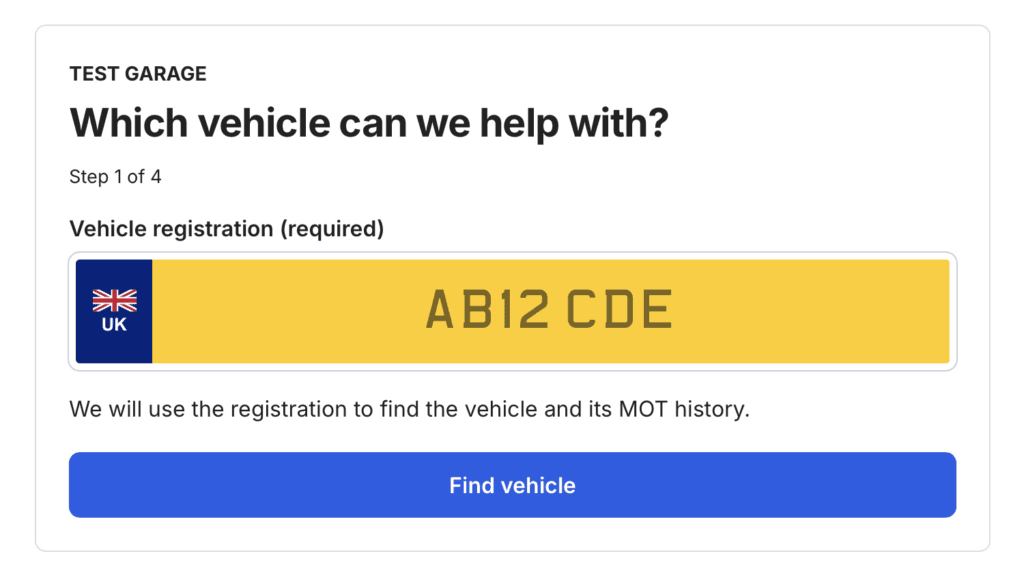
The WordPress product saves enquiries in WordPress and the RCC garage account. A separate EasyWin HTML Form is available for suitable non-WordPress websites.
EasyWin starts from £24.99 per month. Its standard plans include specified monthly vehicle check allowances, with no lead fee or percentage of the job. Review the current product page for the plan applicable to your website.
What if you want a complete MOT and service booking journey?
Rapid Car Check also supports custom MOT and service booking systems by registration. A tailored WordPress integration can identify the vehicle, apply garage-specific service and pricing rules, collect appointment preferences and pass bookings into a supported garage, CRM or appointment system.
The required features, integrations and pricing are agreed as part of a separate development project. Live availability and confirmed booking behaviour depend on what the garage’s receiving systems support.
How to handle MOT repair enquiries before offering a slot
An MOT repair request is a useful test of any online garage journey. One customer wants a routine retest, another has a list of defects and a third has been advised to monitor a worn component. Your website needs to help staff distinguish these jobs before promising time or a price.
Ask for the registration, the work the customer believes is outstanding, whether repairs have already been carried out and any preferred date. Invite customers to describe current symptoms or supply relevant photographs where your form genuinely supports attachments. A recorded MOT result is historical evidence, not a current inspection or a confirmed repair requirement.
The official MOT guidance distinguishes dangerous and major defects, which cause a test failure, from minor and advisory items that can appear on a result. A vehicle with a dangerous defect must not be treated like an ordinary drive-in service appointment. The garage should establish whether the vehicle can lawfully and safely be brought to the workshop before agreeing arrangements.
Use the customer’s account of work already completed alongside available MOT history. Do not convert an old advisory into a quote automatically. Confirm the current fault, necessary inspection and any parts or labour assumptions with the customer.
What should happen when a booking request reaches the garage?
Decide who owns each stage of the journey. With an enquiry form, the garage receives the registration and customer request, reviews the job then contacts the customer to confirm the next action. The website should send a receipt that makes the pending status clear. A preferred date remains a preference until somebody accepts it.
A true appointment system needs more: an authoritative calendar, defined service durations, resource availability, rules for vehicles that need manual review and a reliable way to confirm or decline the selected slot. If two people choose the same appointment, the receiving system must prevent double allocation. Test changes, cancellations, closed days and time slots that become unavailable between selection and confirmation.
If your website connects to existing workshop software, ask your supplier which data travels with the request and what happens when the connection is unavailable. A manual recovery route matters more than an impressive demo that only works when every service responds immediately. Protect customer details, restrict staff access and avoid collecting diagnostic information the garage will never use.
Three journeys to test before choosing garage booking software
- Routine MOT: a customer selects a standard appointment. Confirm whether the result is a genuinely reserved slot or a request that needs a callback
- Intermittent engine fault: a customer enters a registration and a warning light description. Check that the journey offers assessment or quotation instead of an automatic fixed price
- Previous MOT failure: the vehicle record contains historic defects. Confirm that the customer can explain what has been repaired, what still needs attention and whether the car can be moved safely
For a simple vehicle-aware enquiry, review EasyWin for WordPress garages. If your workshop needs agreed pricing rules, live availability or integration with its existing system, discuss a separately scoped custom MOT and service booking system.
Which option should your garage choose?
Choose a simple vehicle enquiry form when…
Your team still needs to confirm whether it can take the job, you offer varied repair services or you want better information from the website without replacing your existing workshop software.
Choose a full booking system when…
You have defined services, managed capacity, reliable prices and a calendar that can accept confirmed appointments. Be particularly careful with services that depend on diagnostic findings or unknown parts requirements.
Choose a custom integration when…
Vehicle information needs to drive service selection, estimates, multiple branches or a connection to an existing workshop platform. Document the requirements before selecting software.
Related guides for garages
Explore the website and workshop requirements in garage website design and workshop software.
A sensible starting point
Look at the last ten enquiries through your website. How many could have been booked with a fixed service and available slot? How many needed a phone call first?
If you mainly need to collect better repair enquiries, try the EasyWin WordPress demonstration. For a bespoke registration-led booking journey, review Rapid Car Check’s custom booking options. Choose the process your garage can actually deliver.